Showing posts with label Chromebook. Show all posts

Tuesday, November 25, 2014

Finally!

We finally got some snow. Granted only a couple of inches but it's better than nothing. I had several errands to do today and I must admit that riding on fresh snow is in the "fun" category. The only place I needed 2WD was returning home up our road. When in 2WD, you do a lot of steering by shifting your weight on the pegs. I suspect that by tomorrow there will be a lot more gravel on the roads.

I needed to pick up a 1⅛" 6-pointed socket to remove the fuel filter on the truck. I had neglected to run the summer fuel out of the system and get some winter fuel. Summer fuel, aka #2 diesel, has a gel point of 10°F to 20°F and the last week or so of below zero temperatures meant that the fuel no longer flows. I have spare fuel filters so the current plan is to clear out the garage enough to park the truck (motorcycles get to live outside for a while) but I need to get the truck running long enough to move it. I'm hoping that replacing the fuel filter and filling the housing with anti-gel chemical and kerosene will enable the truck to run and start enough to move it. With a curb weight of over 7000 lbs, I'm not going to be able to push it.

The other errand was to pick up and return a "dishwasher installation kit" that the salesman said was essential. All of the parts were included with the new dishwasher so 5 seconds after signing for the part, I returned it for a refund. When asked for a reason, I put down "stubborn salesman selling unnecessary accessories".

BTW, this post is being done on an Acer C720P Chromebook. Much faster than the Samsung Chromebook I had picked up a couple of years ago. The key feature is the addition of a touch screen. After years of using an iPad, you get used to simply touching the screen. On this Chromebook, it actually does something. With 4GB of memory, 32 GB SSD and an Intel dual-core processor based on the Haswell architecture, it feels fast enough. The 720p display is much nicer than the older Samsung Chromebook.

Adding photos from the Nexus phone is in the "trivial" category.

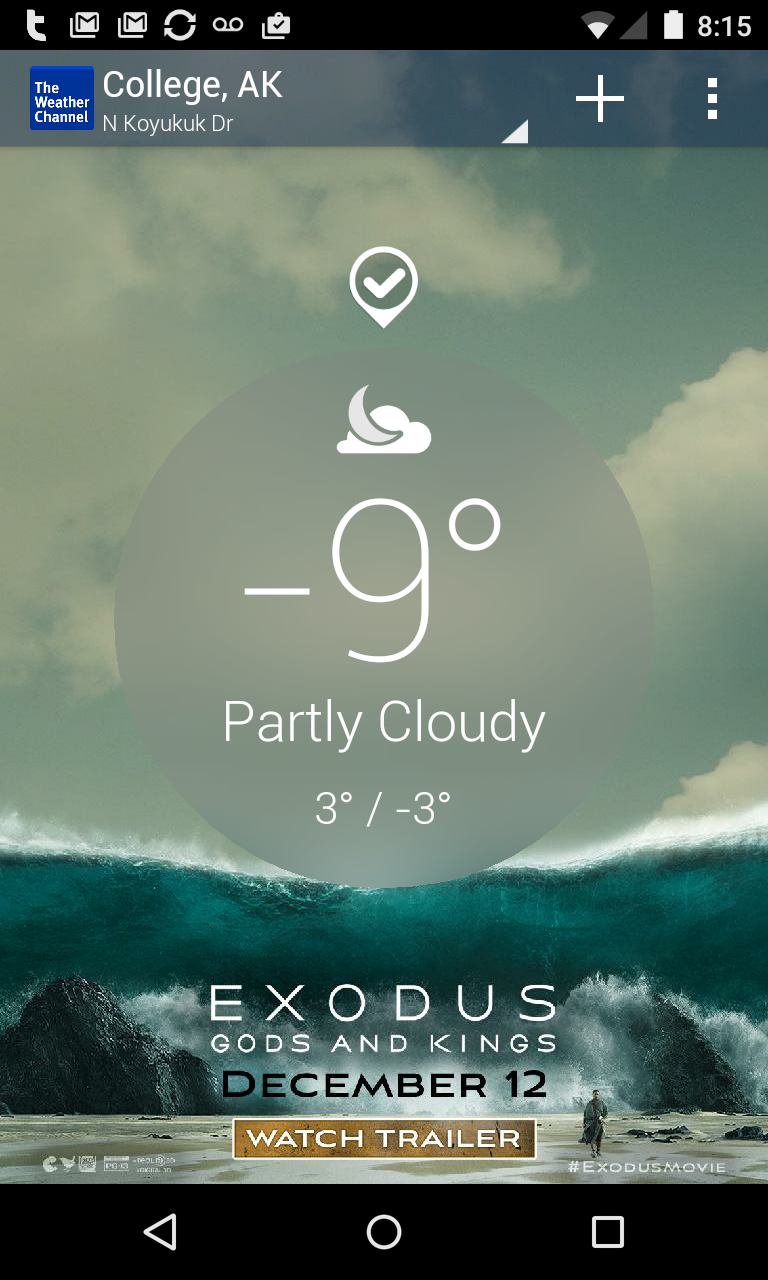
Wednesday Morning Update - Our regular November temperatures have finally returned as well though the Weather Channel is still predicting a low of +3°F for today. This is a screenshot from the Nexus 4 Android phone and to add it to the blog, you just select the "From your phone" tab from within "Insert image" popup window. Couldn't be easier. Though I did have to google how to do a screenshot.

Tuesday, January 29, 2013

Bitterly Cold

According to the National Weather Service, this how they describe interior Alaska. It is almost sunrise this morning when I walked out to get some coffee around 10am. The ice fog is has been pretty bad for the last couple of days and being anywhere in town has been unhealthy according to the EPA. The university is only a little above the valley floor but it is sufficient to get above the ice fog. According to the SMS messages from the police, there have been multiple accidents due to the low visibility.

The temperature is still pretty cold but we are fortunate that there is no wind to make it feel even colder. I have still been able to get out for some short walks. I've been trying out another iPhone app that uses the accelerometer and GPS in a way that tracks your movement without rapidly draining the battery. It seems to be working pretty well and my battery has been lasting most of the day. According to the app, I'm still managing 10k steps per day. I was thinking of trying out the FitBit activity tracker but this seems to work. Now if there was someway to upload the data.

Is it Spring Yet?
I didn't get out to the garage and do anything with the bike due to the cold weather. The garage door was accidentally left open yesterday for about 15 minutes and that was sufficient to shut down the garage heater. I needed to warm it up a bit using a very old, forced air, kerosene heater. But it does put out a lot of heat (and a lot of fumes) and had the interior heated up to about 50°F in about 30 minutes. Eventually, the water from the boiler started running again and the blower kicked back on. It is barely able to keep up at these temperatures.

The dog seems to be watching the sunset last night or else looking for moose. Initially, the cat was sitting there as well staring out the window but as soon as I took out my phone to take a photo, the cat lost interest. There is evidence that a couple of moose have been bedding down in the side yard next to the dog run.

A short update on the ChromeBook. I'm still using it almost exclusively. As you may notice, I started this post on the iPad using Blogsy as it's the easiest way to get pictures taken with my iPhone into a blog post. They nout sync with iCloud and within minutes after taking a picture on the phone, it is available on the iPad or just about any other Apple device. I haven't figured out a good way to access the pictures on the ChromeBook. The only other time I had to break out the laptop was to edit a locked MS Word document. Google Apps could read the document but I couldn't enter text into the fields. For what they were trying to do, a PDF form would be a better choice.


The new tire levers came in from Amazon today. With these, I shouldn't have a problem with enough leverage. They are made by a company called Ken-Tool. I included the pen in the photo as a size comparison.

Tuesday, January 22, 2013

Chromebook - Initial Review

A Samsung Chromebook that I had ordered a couple of weeks ago finally arrived while I was out of town. I was hoping to test it on my last trip. In case you hadn't heard of these before, they have the form factor of a laptop but must be connected to the Internet to be truly useful. In this case, it's closer in weight an size to an 11" Macbook Air at 2.4 lbs and 0.7" thick. No hard drive or optical drive but has 16GB of local storage and includes two years of 100GB Google Drive cloud storage. Also included are 12 coupons for Gogo Inflight Internet access. All for $249. No fans, no spinning drives, no noise. But everything has to be done in a browser.

So far, I have been able to connect with all four of my email accounts, three different cloud storage options, configure x.509 certificate base wireless network access (Eduroam), as well as SSH into multiple Linux servers that I manage. Everything that I normally need a laptop for. Google docs are functional enough for me and there is an offline mode for those times when the Internet isn't available or too slow to be useful. Right after I logged in, all of my bookmarks and extensions came across from the Chrome browser on my Macbook Pro.

The only unusual thing I needed to do was to turn on a simple WPA2 wireless SSID for the initial configuration on first boot. It needed to contact the Google mother ship to validate my credentials. So far, I'm impressed at what you can do for ¼ the price of the cheapest Macbook Air. The materials and build quality aren't the same as the Apple product but then again, look at the price! After a couple of weeks of daily use, I'll post another update.